Print from any browser, no print dialog
printproxy lets a web app print straight to the printer next to you, from an iPad, Chromebook, Android phone or desktop browser. A small agent sits beside the printer and prints only jobs signed by the site you paired it with.
The real take, 18 seconds, uncut: Mobile Safari on an iOS 18.7 simulator loads a page, the page calls connect(), printers() and print(), and the job goes sent → printed on a virtual PDF printer. No dialog appears. The printed file is byte-identical to the PDF the phone sent.
Recorded 2026-10-16 with a file printer; no physical printer was used.
How it works
Your page loads printproxy.js and calls print(). The job reaches printproxy-agent, a single binary on a computer next to the printer, by one of three routes. Every route speaks the same API (/v1/printers, /v1/jobs), and printproxy.connect() probes all the routes you configure at once and uses the first that answers, in the order same PC, LAN, relay.
iPad, Chromebook and Android cannot run the agent. Put the agent on another always-on box next to the printer: a PC, a Mac, or a Linux box such as a Raspberry Pi. Those devices then reach it through the relay (works today) or on the LAN once they trust the agent's CA.
Where it fits
print() call as every other job. ESC/POS output is not yet tested on a physical printer.user routing), and you never touch their network.When you need it
| Your situation | Without printproxy | With printproxy |
|---|---|---|
| Users print from iPad, iPhone, Chromebook or Android | QZ Tray is desktop-only, and Zebra Browser Print has no iPad or iPhone version. | The phone talks to the relay, and the agent sits on a Mac or Linux box (such as a Raspberry Pi) next to the printer. |
| Customers must install a localhost bridge or accept certificate pop-ups | You write support articles about certificate renewals and the "proceed unsafe" warning. | The browser never calls localhost on the relay route. The agent is a single signed-job binary. |
| Mixed printer brands (Zebra, Star, Epson, office) | One vendor SDK per brand | One API: pdf, image, text, markdown, office, and raw ESC/POS or ZPL (raw output not yet tested on a physical printer). |
| You print from your backend, not the page | A cloud print vendor billed per print | The same /v1/jobs API, and the relay is self-hostable. |
| Regulated documents (prescriptions, lab, finance) | API keys only | Ed25519-signed jobs. You can self-host, so no new data processor is added. |
You don't need it if a person is happy to click the browser's print dialog on a desktop every time.
Integrate from your backend
The core API is three calls, each with Authorization: Bearer <print key>. Full runnable examples exist for JS, Python, PHP, Java and Go; ask for them when you join the alpha.
GET  /v1/printers                                -> {"printers":[{"name","driver","is_default","state"}]}
POST /v1/jobs {"kind","payload_b64","printer"?}  -> {"id","status":"queued",...}
GET  /v1/jobs/{id}?wait=25&after=<status>        -> long-poll until printed | failed | expired
Node 18+
const api = (m, p, b) => fetch(process.env.PRINTPROXY_URL + p, { method: m,
  headers: { Authorization: `Bearer ${process.env.PRINTPROXY_KEY}`, "Content-Type": "application/json" },
  body: b && JSON.stringify(b) }).then(r => r.json());
let job = await api("POST", "/v1/jobs", { kind: "pdf", payload_b64: pdf.toString("base64") });
while (!["printed", "failed", "expired"].includes(job.status))
  job = await api("GET", `/v1/jobs/${job.id}?wait=25&after=${job.status}`);
Python 3 (stdlib)
body = {"kind": "pdf", "payload_b64": base64.b64encode(pdf).decode()}
job = api("POST", "/v1/jobs", body)
while job["status"] not in ("printed", "failed", "expired"):
    job = api("GET", f"/v1/jobs/{job['id']}?wait=25&after={job['status']}")
PHP 8
$job = api('POST', '/v1/jobs', ['kind' => 'pdf', 'payload_b64' => base64_encode($pdf)]);
while (!in_array($job['status'], ['printed', 'failed', 'expired']))
    $job = api('GET', '/v1/jobs/' . rawurlencode($job['id']) . '?wait=25&after=' . $job['status']);
Receipt (ESC/POS) from the page (not yet tested on a physical printer)
const esc = "\x1b@" + "Table 4\n2 x Flat white   7.00\n\n\n" + "\x1dV\x00"; // init, text, cut
await printproxy.print(esc, { printer: "receipt", kind: "escpos" });
Label (ZPL) (not yet tested on a physical printer)
await printproxy.print("^XA^FO50,50^A0N,40,40^FDOrder 1042^FS^XZ", { printer: "zebra", kind: "zpl" });Alpha tester guide
- 1
Get the agent
on requestAlpha builds are sent on request: macOS, Linux (including 64-bit and 32-bit Raspberry Pi) and Windows. Join the alpha and tell us which.
- 2
Start with a virtual printer
config.tomlProve the path before any paper moves. A file printer writes each job to a new file:
printproxy-agent default-config > config.toml # in config.toml: [[file_printers]] name = "pdf-file" dir = "/tmp/printproxy-out" printproxy-agent printers --config config.toml # read-only list printproxy-agent run --config config.toml - 3
Mint keys
printproxy-relay gen-keyEach key is printed once; the relay stores only its sha256. Keep one
role = "admin"key for pairing (backend and console only) and give the web page arole = "print"key, which can list printers and print, nothing else.printproxy-relay gen-key --site clinic printproxy-relay default-config > relay.toml # add the [[keys]] block printproxy-relay serve --config relay.toml - 4
Pair by fingerprint + code
once per agentThe agent writes a single-use code (
ABCD-EFGH, 10 minutes, burned after 5 wrong guesses) to<state_dir>/pairing_codeand its fingerprint (3f9a-01bc-77de-5a20) to<state_dir>/fingerprint. Pair with both, then check the fingerprint in the answer matches the box.curl -H "Authorization: Bearer $PP_ADMIN_KEY" \ -H 'Content-Type: application/json' \ -d '{"fingerprint":"3f9a-01bc-77de-5a20","code":"ABCD-EFGH"}' \ https://<your-relay>/v1/pair - a name alone → 400 fingerprint_required · wrong code → pair_err, nothing bound
- 5
Open the console
/console/The relay serves an admin console at
/console/: printers per agent, jobs (in-flight ones update live), agents and pairing, API keys. Sign in with the admin key; it stays in that tab's sessionStorage. Use it on a trusted device, over HTTPS.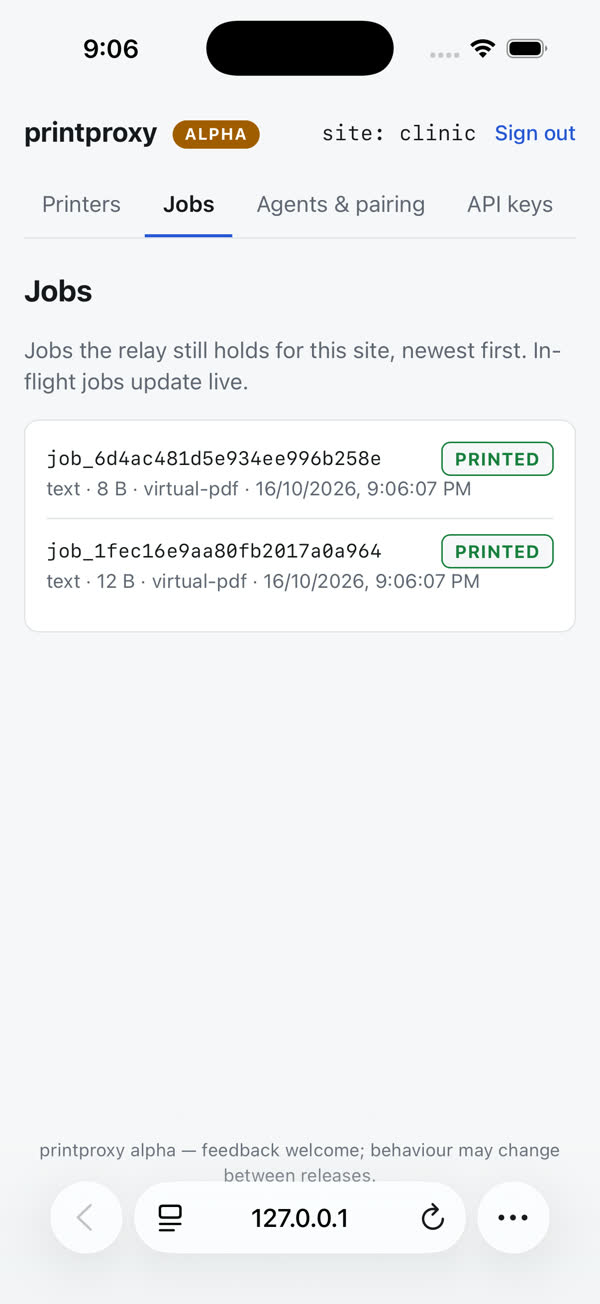
- 6
Print from your page
printproxy.js 0.4.1<script src="https://<your-relay>/printproxy.js"></script> <script> const c = await printproxy.connect({ local: { url: "http://localhost:8789", apiKey: "ppl_…" }, lan: { url: "https://192.168.1.20:8790", apiKey: "ppl_…" }, relay: { url: "https://<your-relay>", apiKey: "pp_…" }, }); c.route; // "local" | "lan" | "relay" const list = await printproxy.printers(); await printproxy.print(pdfBlob, { printer: "pdf-file" }); </script>Configure only the routes you use. The
ppl_key comes fromprintproxy-agent local-key --config config.toml. Setcors_originsto your web app's origin on the agent and the relay.
What it prints
| kind | macOS / Linux | Windows | TCP 9100 printer |
|---|---|---|---|
pdf | CUPS (lp) | SumatraPDF | refused |
image png, jpeg | CUPS, fit to page | SumatraPDF | refused |
text, markdown | rendered to an A4 PDF inside the agent, then as pdf, so every OS prints the same pages | refused | |
office docx, xlsx, pptx, odt, rtf, csv | converted to PDF by LibreOffice on the agent (agent 0.5.0+, LibreOffice must be installed), then as pdf | refused | |
raw ESC/POS, ZPL | CUPS raw | raw TCP printer only | sent as-is |
html | refused (unsupported_kind): render HTML to PDF in your app and send pdf | ||
Receipts and labels. Add the printer's address to the agent and send kind: "raw" with ESC/POS or ZPL bytes:
[[printers]]
name = "receipt"
addr = "192.168.1.50:9100"
Windows. PDF, images, text and markdown print through a bundled, unmodified SumatraPDF.exe shipped beside the agent. Windows printing is new in this alpha and has not yet been verified against a real Windows print queue; tell us what you see.
Troubleshooting
| You see | Why | Fix |
|---|---|---|
| LAN route never wins on iPad / Chromebook / Android | An https page cannot call http on the LAN (mixed content), and the device does not trust the agent's certificate yet. | Set lan_bind, open https://<agent-ip>:8790/ca.crt on the device, install it and turn on full trust (compare the fingerprint with the agent log first). Until then connect() uses the relay. |
| Chrome asks to allow local network access | Chrome's Private / Local Network Access rules for public pages calling private addresses. | The agent answers the preflight; allow the prompt once per site. |
HTTP 429 rate_limited | The relay's per-key rate limit, or too many agent connections from one address. | Slow down, batch jobs, or call the relay from your backend. |
job failed: agent_too_old | The agent predates the job kind (image, text, markdown need 0.3.0 or later). | Update printproxy-agent. |
400 fingerprint_required | Pairing named the agent by display name only. | Pair with the fingerprint from <state_dir>/fingerprint. |
job stays queued, then expired | No paired agent with that printer is online. | Start the agent; check it in the console's Printers tab. |
Security
- The agent only connects outbound; no port is opened for the relay route.
- Every job is signed (Ed25519) with the paired site's key and checked by the agent: signature, payload hash, expiry, replayed nonce.
- A job whose agent drops before confirming is marked failed, never re-sent.
- Print keys print; only admin keys pair or unpair.
- Unpaired agents keep their records; nothing is deleted.
Join the alpha
printproxy is in alpha and has no public price. A one-time licence, no subscription, is available on request for early sites and integrators. Leave your details and we will send an alpha build.
Sources: 28 ms is one take on a single Mac (phone simulator, relay and agent all local), 2026-10-16. 1284 ms is the median of three takes (1222, 1284, 1609 ms) from a phone simulator in India through a relay on a server in Germany to an agent back on the Mac, 290 ms round trip, 2026-10-16. Both used a file printer.